Back to EECS 31L Index
EECS 31L • Study Notes • Verilog Basics
Mahmoud Elfar • Spring 2026 • v0.2
0.1: Initial version
0.2: Added concatenation and replication operators
Table of Contents
Like any other language, you need to mainly focus on three things:
a = b + c?a = b + c mean? Does it mean addition or logical OR?assign keyword before a = b + cThis study note will not stop and explain everything, so it is crucial to have some level of awareness and self reflection while reading it: what are you reading now? What are you struggling to understand? Is it the syntax, semantics, or constructs?
See: IEEE 1800-2017, 3.3 Modules, pg. 47
module <module_name> (port_list);
  // module body
endmodule
Module consists of:
module <module_name> (port_list);
;input, output, inoutendmodule indicates the end of the module definitionExample: Let’s write a module that implements a 3-input AND gate.
and3a, b, cyy = a & b & cand3_2, and3_3, and3_4.// Explicitly declaring port directions in the header
module and3 (input a, input b, input c, output y);
y = a & b & c; endmodule
// Grouping ports that share the same direction and bit width
module and3_2 (input a, b, c, output y);
y = a & b & c; endmodule
// Only declare port names in the header, and their directions in the body
module and3_3 (a, b, c, y);
input a; input b; input c; output y;
y = a & b & c; endmodule
// Same story
module and3_4 (a, b, c, y);
input a, b, c; output y;
y = a & b & c; endmodule
REF: IEEE 1800-2017, 23.3 Module instances, pg. 708
Suppose you want to use 10 of those and3 gates in your design. You instantiate 10 instances (copies) of and3.
and3)minterm_6)Syntax:
// Instantiation via named port connections
<module_name> <instance_name> ( .port_name(signal_name), ... );
// Instantiation via ordered port connections
<module_name> <instance_name> (signal_name1, signal_name2, ...);
So, you either connect ports by explicitly naming them, or by providing the signals in the same order as the ports are declared in the module definition.
Example:
// Instantiate a 3-input AND, call it minterm_7, and connect its ports to signals d0, d1, d2, and m7
and3 minterm_7 ( .a(d0), .b(d1), .c(d2), .y(m7) );
// Instantiate another for minterm_6
and3 minterm_6 ( .a(d0not), .b(d1), .c(d2), .y(m6) );
A module is the basic building block of the digital design — just like the mitochondria is the powerhouse of the cell.
When you design a digital system, you must specify its peripheral interfaces first (i.e. its ports).
A module in Verilog models this concept of a self-contained design unit with a well-defined interface.
Once a module is defined, it can be used and reused. As an analogy, a module definition is like a blueprint for a car, and each time you instantiate the module, it’s like building a new car based on that blueprint.
If you are familiar with object-oriented programming, think of classes and objects.
See: IEEE 1800-2017, 6 Data types, pg. 83
Data types in Verilog refers to the different types of data that can be used in a Verilog design. A data type is a classification that is associated with:
There are many data types in Verilog, and covering them now won’t make much sense. This will be one of the topics that will randomly resurface when studying other topics. So, whenever you see a new data type, it is time to learn it.
reg a;, a is an object)reg a, reg is a data type)There are two main categories of data types (or objects if you will): nets and variables.
There is no analogy for this in software, so pay attention.
wire, tri, wand, wor, triand, trior, trireg. In 99% of the time, you will only use wire. The other net types are for wires with multiple drivers, where each has a different resolution behavior. This is out of scope for this course.| Aspect | Nets | Variables |
|---|---|---|
| Concept | Connection / signal | Storage / value holder |
| Assignment type | Continuous (assign) |
Procedural (always, initial) |
| Stores value? | No (reflects drivers) | Yes (holds last assigned value) |
| Drivers | Can have multiple drivers | Typically single driver |
| Update behavior | Updates continuously with inputs | Updates when assigned |
| Used in | Dataflow / structural | Behavioral |
| Default value | z (undriven) |
x (uninitialized) |
| Example | wire y; assign y = a & b; |
reg y; always @(*) y = a & b; |
0: logic low1: logic highx: unknown (a meta value)z: high impedance (disconnected, undriven, also a meta value)0 and 1 belong to the binary logic as we know it, while all four values belong to what is known as the 4-state logic.| wire/tri | 0 | 1 | x | z |
|---|---|---|---|---|
| 0 | 0 | x | x | 0 |
| 1 | x | 1 | x | 1 |
| x | x | x | x | x |
| z | 0 | 1 | x | z |
wire [3:0] a; // 4-bit wire vector (bits 3 down to 0)
wire [0:3] b; // 4-bit wire vector (bits 0 up to 3), same as a, no difference in functionality
wire [-1:4] c; // 6-bit wire vector (bits -1 up to 4), don't do this though, it is mildly infuriating
We are only interested in the following integer data types:
reg: 4-state data type, unsigned, vector size defined by user, a variable that can hold a value and is updated in procedural blocks (e.g. always, initial)integer: a variable that can hold an integer value (32-bit signed by default), usually used for loop counters and testbenches, not synthesizablelogic: 4-state data type, unsigned, vector size defined by userb: binaryo: octald: decimalh: hexadecimal<size>'<base><value>
<size>: number of bits (optional, but recommended for clarity)<base>: one of the base indicators (b, o, d, h)<value>: the actual number in the specified base4'b1010 represents a 4-bit binary number with the value 10 in decimal.See: IEEE 1800-2017, 11.3 Operators, pg. 255
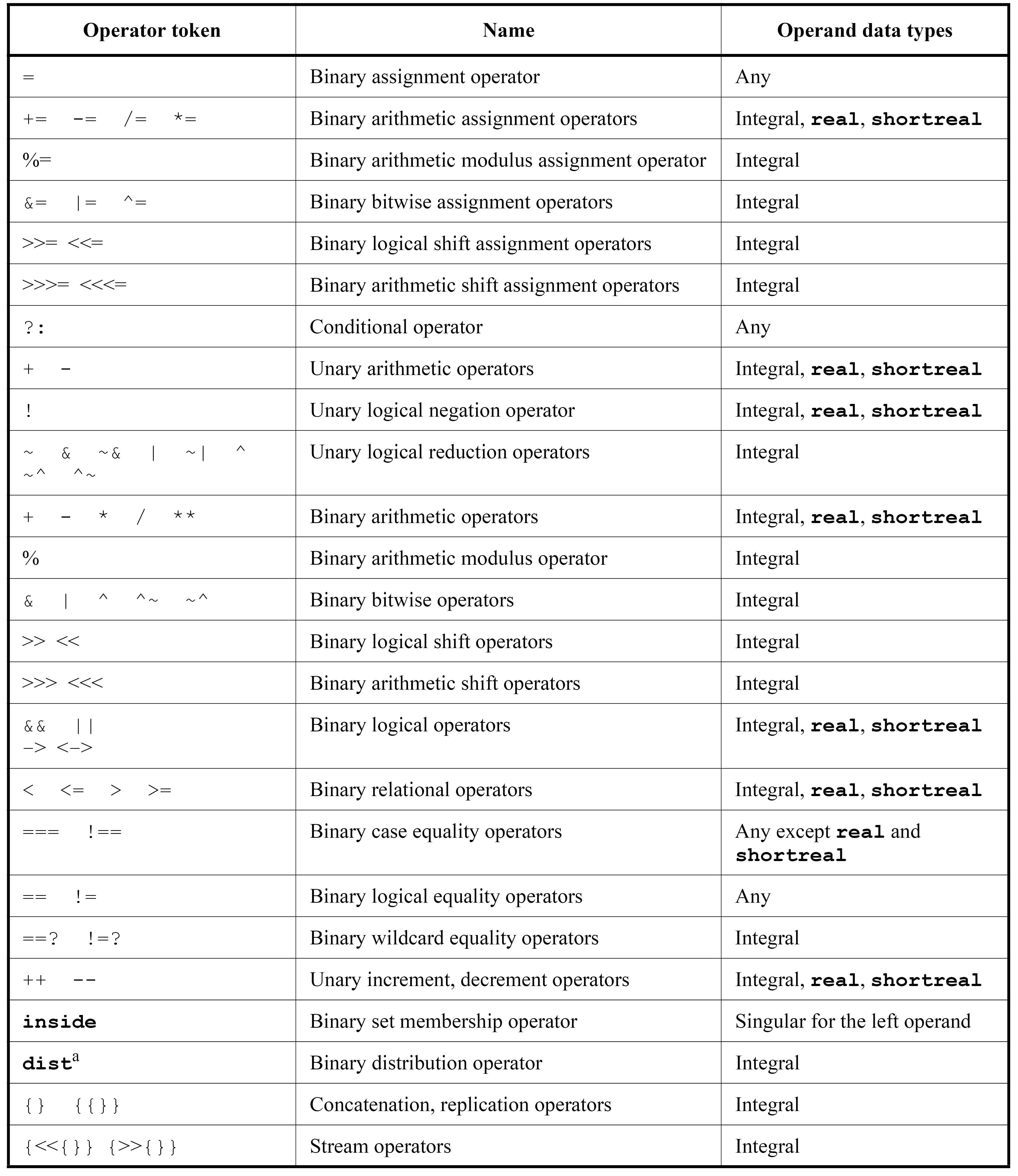
Operators are special symbols used to build expressions. Okay let’s take it one step at a time.
| Operator token | Name | Examples |
|---|---|---|
= |
Binary assignment | a = b; |
+= -= /= *= |
Binary arithmetic assignment | a += b; –> a = a + b; |
%= |
Binary arithmetic modulus assignment | a %= b; –> a = a % b; |
&= |= ^= |
Binary bitwise assignment | a &= b; –> a = a & b; |
>>= <<= |
Binary logical shift assignment | a >>= b; –> a = a >> b; |
>>>= <<<= |
Binary arithmetic shift assignment | a >>>= b; –> a = a >>> b; |
?: |
Conditional operator | Y = (A) ? B : C; –> if (A) Y = B; else Y = C; |
! |
Unary logical negation | Y = !A; –> if (A) Y = 0; else Y = 1; |
~ & ~& | ~| ^ ^~ ~^ |
Unary logical reduction | a = ~4'b0010; –> a = 4'b1101; |
+ - * / ** |
Binary arithmetic | |
% |
Binary arithmetic modulus operator | |
& | ^ ^~ ~^ |
Binary bitwise | |
>> << |
Binary logical shift | |
>>> <<< |
Binary arithmetic shift | |
&& || -> <-> |
Binary logical | |
< <= > >= |
Binary relational | |
=== !== |
Binary case equality | |
== != |
Binary logical equality | |
++ -- |
Unary increment/dec. (SystemVerilog) | |
{ } { { } } |
Concatenation, replication |
We will only cover a subset of these operators in this course.
They are operators that take a single operand, operate on its bits, and produce a single-bit result (thus the word “reduction”).
~: The only exception — this is just bitwise negation. It returns the complement.
~4'b0010 –> 4'b1101~5'b1 –> 5'b11110&: AND reduction. It returns the logical AND of all bits.
&4'b1011 –> 0&4'b1111 –> 1|: OR reduction. It returns the logical OR of all bits.
|4'b0000 –> 0|4'b1000 –> 1^: XOR reduction. It returns the logical XOR of all bits (returns 1 if number of 1s is odd).
^4'b1011 –> 1^4'b1000 –> 1^4'b1100 –> 0&: bitwise AND. It performs a logical AND on each pair of corresponding bits.
4'b1010 & 4'b1100 –> 4'b10004'b1010 & 4'b0101 –> 4'b00004'b1111 & 4'b0010 –> 4'b0010|: bitwise OR. It performs a logical OR on each pair of corresponding bits.
4'b1010 | 4'b1100 –> 4'b11104'b1010 | 4'b0101 –> 4'b11114'b0000 | 4'b0010 –> 4'b0010^: bitwise XOR. It performs a logical XOR on each pair of corresponding bits.
4'b1010 ^ 4'b1100 –> 4'b01104'b1010 ^ 4'b0101 –> 4'b11114'b0000 ^ 4'b0010 –> 4'b0010~&: NAND.~|: NOR.~^ or ^~: XNOR.This is where it gets a bit confusing. Notice how these operators result in 1 single bit, and not a vector of bits like the bitwise operators above.
Do not forget: Anything that is not 0 is logically 1/true.
&&: logical AND. It returns 1 if both operands are non-zero, otherwise it returns 0.
4'b1010 && 4'b1100 –> 14'b1010 && 4'b0000 –> 04'b0000 && 4'b0000 –> 0||: logical OR. It returns 1 if at least one operand is non-zero, otherwise it returns 0.
4'b1010 || 4'b1100 –> 14'b1010 || 4'b0000 –> 14'b0000 || 4'b0000 –> 0>> and <<: logical shift right and left. Vacant bits are filled with zeros.
4'b1010 >> 1 –> 4'b01014'b1010 << 1 –> 4'b01004'b0111 >> 2 –> 4'b0001>>> and <<<: arithmetic shift right and left. When shifting right, vacant MSBs are filled with the sign bit (the most significant bit).
4'b1010 >>> 1 –> 4'b11014'b1010 <<< 1 –> 4'b01004'b0111 >>> 2 –> 4'b00014'b1111 >>> 2 –> 4'b1111== and !=: logical equality and inequality. Logical equality returns 1 if both operands have only 0s and 1s and are identical, otherwise it returns 0.
4'b1010 == 4'b1010 –> 14'b1010 == 4'b1000 –> 04'b1010 == 4'b11x0 –> 0 (whether x is 0 or 1, the operands are not identical)4'b11x0 == 4'b11x0 –> x (output depends on the value of x, hence, we don’t know if they are equal or not, i.e., x)=== and !==: exact equality and inequality. Exact equality returns 1 if both operands are identical, including x and z values, otherwise it returns 0.
4'b1010 === 4'b1010 –> 14'b1010 === 4'b1000 –> 04'b1010 === 4'b11x0 –> 0 (whether x is 0 or 1, the operands are not identical)4'b11x0 === 4'b11x0 –> 1 (both operands are identical, including the x){ }Concatenation joins multiple signals or constants into a single wider vector. The first item listed becomes the MSBs.
assign <lhs> = { expr1, expr2, ..., exprN };
Examples:
wire [3:0] a, b;
wire [7:0] y;
assign y = {a, b};              // y[7:4] = a, y[3:0] = b

wire [1:0] hi;
wire [2:0] lo;
wire [4:0] out;
assign out = {hi, lo};          // 5-bit result: hi in top 2 bits, lo in bottom 3

wire c_out, s;
wire [3:0] x, z;
assign {c_out, s} = x[0] + z[0];  // split carry and sum of a 1-bit addition
The last example shows that concatenation can appear on the LHS as well — a useful trick for capturing the carry and sum of an addition into separate wires.
{ { } }Replication repeats a signal or constant a specified number of times.
assign <lhs> = { N { expr } };
Examples:
wire [7:0] y;
wire a;
assign y = {8{a}};              // replicate a 8 times: y = aaaaaaaa

wire [3:0] nibble;
assign y = {2{nibble}};         // y[7:4] = nibble, y[3:0] = nibble
A common application: sign-extending a signed value.
wire [3:0] signed_in;
wire [7:0] sign_extended;
assign sign_extended = { {4{signed_in[3]}}, signed_in };
// The sign bit (MSB) of signed_in is replicated 4 times to fill the upper byte
// and continue until the end of the line./* and end with */. They can span multiple lines./*
This is a block comment.
It can span multiple lines.
*/
// This is a single-line comment.
// Compiler directive syntax
`directive_name [arguments]
A compiler directive is a special instruction that provides information to the compiler or simulator.
For now, there is only one directive that we will be using.
timescale:
s, ms, us (microseconds), ns (nanoseconds), ps (picoseconds), fs (femtoseconds).`timescale <time_unit> / <time_precision>
Example:
// Tell your compiler that the time unit in your design is 1 nanosecond, and the time precision is 1 picosecond.
`timescale 1ns / 1ps
A system task is a built-in function provided by the Verilog language that performs a specific operation during simulation. System tasks are typically used for
controlling the simulation flow
They have no synthesis semantics.
What we care about for now:
$display:
printf) to display variable values in different formats.$finish:
Example:
// Print a silly message to the console
$display("a silly message to the console");
// Print the value of a variable as a decimal, hexadecimal, and binary number
$display("The value of a is: %d (decimal), %h (hex), %b (binary)", a, a, a);
// Print the value with specific field width and padding
$display("The value of a is: %8d (decimal, right-aligned, occupies at least 8 characters)", a);
$display("The value of a is: %08b (binary, zero-padded to 8 bits)", a);
// Print special characters
$display("This is a new line\nThis is a tab\tThis is a percent sign%%");
// Stop the simulation right there
$finish;