RISC-V Instruction Formats
Back to EECS 31L Index
EECS 31L • Study Notes • Instruction Set Architecture
Mahmoud Elfar • Spring 2026 • v0.1
v0.1: Initial version
Table of Contents
An Instruction Set Architecture (ISA) is the contract between software and hardware. It defines exactly four things:
Notice what the ISA does not define: how the hardware is built, how fast it runs, how many pipeline stages it has, or how it is implemented in silicon. Those are microarchitecture decisions. The ISA is the what; the microarchitecture is the how.
Two processors with completely different internal designs (different transistor counts, different clock speeds, different die sizes) can run the same program without modification if they implement the same ISA. This separation is what makes software portable.
Even a better example: FF-X (Final Fantasy X) is a video game (a program, a long list of instructions) runs on PlayStation 2 because it uses the same ISA for the PS2’s CPU (called Emotion Engine). The actual console hardware implements the EE ISA, and so it can run the game. At the same time, you can write a software that decodes the EE ISA, and then run the decoded instructions (e.g., an addition) on your personal computer or laptop. The implementation of the EE ISA in this case is done in software (not hardware) that emulates the hardware, hence the name “emulator”. PCSX2 is an example of a PS2 emulator that we will use in one of the examples in class.
In this course, the ISA we use is RISC-V: a modern, open, and deliberately simple ISA designed for education and industry alike.
An instruction is a single, indivisible command to the processor. It tells the processor to perform one specific operation — add two numbers, load a value from memory, store a value to memory, and so on.
Every instruction exists at three levels of abstraction simultaneously:
Semantics : what the instruction means, described in plain language or mathematical notation.
Bitwise-AND the values in registers x19 and x22, and store the result in register x5.
Assembly : a human-readable symbolic representation of the instruction, using mnemonics and register names.
and x5, x19, x22
Machine code : the binary encoding of the instruction, exactly as the processor reads it from memory.
0000000 10110 10011 111 00101 0110011
These three representations describe the same instruction. The compiler produces assembly from source code. The assembler produces machine code from assembly. The processor reads and executes machine code. You need to be fluent in moving between all three.
Not all instructions need the same information. Consider:
add x5, x19, x22 needs two source registers and one destination register — three register indices.addi x9, x14, -7 needs one source register, one destination register, and a constant — two register indices and an immediate.sw x17, 48(x6) needs two source registers and a constant — two register indices and an immediate, but no destination register.If we tried to encode all instructions in a single fixed layout, we would waste bits for instructions that need fewer fields, or run out of space for instructions that need more. Instruction types are the solution: each type defines a specific field layout tailored to the class of instructions that share the same operand structure.
RISC-V uses several types. In this course we focus on three: R-type, I-type, and S-type.
There is a hardware motivation as well. In the datapath, the register file must read rs1 and rs2 before the instruction is decoded — there is not enough time to first determine the type and then fetch the registers. RISC-V solves this by keeping rs1 and rs2 at the same bit positions (bits [19:15] and [24:20]) across all types that use them. The hardware can always extract register indices from the same positions, regardless of type. This is not an accident — it is a deliberate constraint in the ISA design that simplifies the microarchitecture.
| Term | Meaning |
|---|---|
| Encoding | The process of converting an instruction from assembly (or semantics) into its binary machine code representation. |
| Decoding | The process of converting a binary machine code word back into its fields, identifying the instruction, and determining the values of its operands. |
| Field | A named group of bits within an instruction word that carries one piece of information. Examples: opcode, rd, rs1, funct3. Each field occupies a fixed bit range. |
| Source | An address – provided by the instruction – of the value to be read. Examples: rs1 means the source register of the first operand. |
| Destination | An address – provided by the instruction – of the value to be written. Examples: rd means the destination register of the result. |
| Register operand | A register used as a source or destination of an instruction. Referred to by name in assembly (x5, x19) and by index in machine code (the 5-bit binary value of the register number). |
| Address | A general term for any value used to index into a memory or register file. Context determines whether it refers to a register address or a memory address. |
| Register address | The index of a register in the register file. 5 bits wide in RISC-V (since there are 32 registers: log₂32 = 5). Not to be confused with a memory address. |
| Memory address | The byte address of a location in data memory. 32 bits wide in RV32I. Computed by the ALU during execution (typically rs1 + immediate). |
| Immediate | A constant value embedded directly in the instruction encoding. Abbreviated as imm. Unlike a register operand, it is not read from the register file; it is extracted from the instruction word itself and sign-extended before use. |
About Addresses:
If you are still confused about what an address is, think about a 16-to-1 multiplexer.
0000, the output data is the value at input #0.0001, the output data is the value at input #1.0010, the output data is the value at input #2.The select line values 0000, 0001, 0010, etc. are the addresses. The output of the multiplexer is the data that corresponds to the applied address.
Register and memory addresses work the same way. In fact, both hardware compoenents (register file and data memory) include multiplexers in their construction that use the provided addresses to select which register or memory value to output.
About Register Names:
RISC-V registers are named x0 through x31, or r0 through r31.
x0 is 0x00x1 is 0x01x2 is 0x02x31 is 0x1FAlso, r1 and rs1 refer to two different things. r1 means the register with address 0x01. rs1 means the source register field (could be any register, depending on the specific instruction).
Before we start: You do not need to memorize the instruction formats. You only need to understand how to read them and use them to encode and decode instructions. In this course, we are using RISC-V as an example. In the exam, you will be given excerpts from the ISA document that include the instruction formats. You should, however, memorize the meaning of each field.
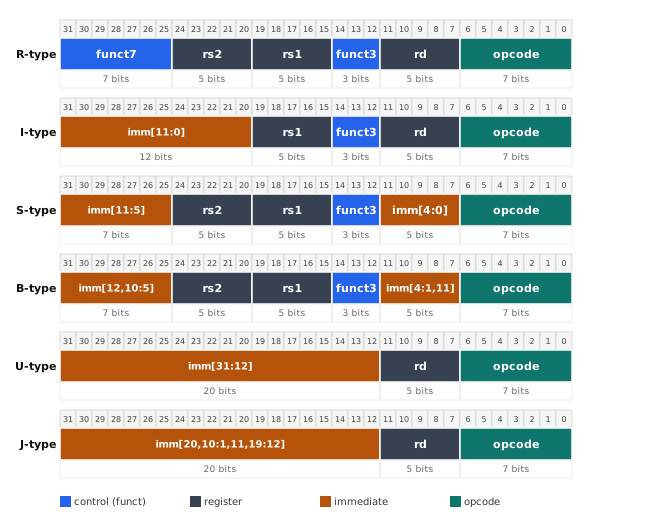
Every RISC-V instruction is exactly 32 bits wide. Those 32 bits are divided into named fields. The following fields appear in the R/I/S formats we use in this course:
| Field | Bits | Width | Meaning |
|---|---|---|---|
opcode |
[6:0] | 7 | Identifies the broad instruction category |
rd |
[11:7] | 5 | Destination register index |
funct3 |
[14:12] | 3 | Secondary opcode; distinguishes instructions within a category |
rs1 |
[19:15] | 5 | First source register index |
rs2 |
[24:20] | 5 | Second source register index |
funct7 |
[31:25] | 7 | Tertiary opcode; used in R-type to distinguish e.g. ADD from SUB |
Not every type uses all fields. The immediate field replaces some fields where a register index is not needed.
RISC-V Instruction Formats
In this course, we will focus on three types only: R, I, and S.

Used for register-to-register arithmetic and logic operations. Both source operands come from registers; the result goes to a register.
31      25 24    20 19    15 14  12 11     7 6      0
+--------+--------+--------+------+---------+-------+
| funct7 |  rs2   |  rs1   |funct3|   rd    |opcode |
| 7 bits | 5 bits | 5 bits |3 bits| 5 bits  | 7 bits|
+--------+--------+--------+------+---------+-------+
opcode = 0110011 for all R-type instructions.funct3 and funct7 together identify the specific operation (e.g., ADD vs. SUB share the same opcode and funct3 but differ in funct7).add, sub, and, or, xor, sll, srl, sra, slt, sltu
For some reason, I-type is split into two subtypes: Arithmetic and Load. The difference is in semantics and opcode, not format. Both share the same field layout.
I-type (Arithmetic)
Used for arithmetic and logic operations where one operand is a constant (immediate) embedded in the instruction.
31          20 19    15 14  12 11     7 6      0
+------------+--------+------+---------+-------+
|  imm[11:0] |  rs1   |funct3|   rd    |opcode |
|  12 bits   | 5 bits |3 bits| 5 bits  | 7 bits|
+------------+--------+------+---------+-------+
opcode = 0010011 for I-type arithmetic instructions.imm[11:0] is a 12-bit two’s-complement signed immediate, giving a range of −2048 to +2047. It is sign-extended to 32 bits before use.rs2 field – the second operand is the immediate, not a register.funct7 field – its bit range is occupied by the upper part of the immediate.addi, andi, ori, xori, slti, slli, srli, sraiI-type (Load)
Load instructions share the I-type field layout but use a different opcode and semantics. Instead of computing a result to store in a register, they compute a memory address and load a value from that address.
31          20 19    15 14  12 11     7 6      0
+------------+--------+------+---------+-------+
|  imm[11:0] |  rs1   |funct3|   rd    |opcode |
|  12 bits   | 5 bits |3 bits| 5 bits  | 7 bits|
+------------+--------+------+---------+-------+
opcode = 0000011 for load instructions.rs1 is the base address register.imm[11:0] is the byte offset. Effective address = rs1 + SignExt(imm).rd is the destination register where the loaded value is written.funct3 selects the load width (010 = lw, load word).lw, lh, lb, lhu, lbu
Store instructions write a register value to memory. They need two source registers (base address and data to store) but no destination register — the result goes to memory. The 12-bit immediate is split into two separate fields to keep rs1 and rs2 at the same bit positions as in R-type.
31      25 24    20 19    15 14  12 11     7 6      0
+--------+--------+--------+------+---------+-------+
|imm[11:5]|  rs2  |  rs1   |funct3|imm[4:0] |opcode |
| 7 bits | 5 bits | 5 bits |3 bits| 5 bits  | 7 bits|
+--------+--------+--------+------+---------+-------+
opcode = 0100011 for store instructions.rs1 is the base address register.rs2 is the register whose value is written to memory.imm[11:5] (bits [31:25]) and imm[4:0] (bits [11:7]) are the two halves of the 12-bit offset. To recover the immediate: concatenate imm[11:5] and imm[4:0]. Effective address = rs1 + SignExt(imm).rd field — stores do not write to the register file.The split immediate is the price paid for keeping rs1 and rs2 at fixed positions. If the immediate were contiguous, one of the register fields would have to move, which would complicate the register file read logic in the datapath.
sw, sh, sb🕹️ Check out the Datapath-v2 Simulator. Use it to test your understanding of ISA encoding and decoding.
Given an instruction in assembly, produce its 32-bit machine-code word.
Checklist:
and, addi, lw, sw).x19 → 10011.imm[11:5] and imm[4:0].Given a 32-bit machine code word in hexadecimal, identify the instruction and recover all operand values.
Checklist:
opcode.funct3 from bits [14:12].funct7 from bits [31:25].rs1 = bits [19:15]rs2 = bits [24:20]rd = bits [11:7]imm[11:0] = bits [31:20]. Sign-extend to 32 bits.imm[11:5] = bits [31:25], imm[4:0] = bits [11:7]. Concatenate → sign-extend.00011 → x3).and x5, x19, x22Step 1–2. Look up and in the ISA table:
01100111110000000Step 3. R-type layout: funct7 | rs2 | rs1 | funct3 | rd | opcode
Step 4. Convert registers:
001011001110110Step 5. No immediate.
Step 6–7. Assemble:
funct7    rs2     rs1    funct3   rd     opcode
0000000  10110   10011    111   00101  0110011
Machine code: 00000001011010011111001010110011 = 0x0169F2B3
addi x9, x14, -7Step 1–2. Look up addi:
0010011000Step 3. I-type layout: imm[11:0] | rs1 | funct3 | rd | opcode
Step 4. Convert registers:
0100101110Step 5. Immediate = −7. Two’s complement (12 bits):
000000000111111111111000111111111001Step 6–7. Assemble:
imm[11:0]       rs1    funct3   rd     opcode
111111111001   01110    000   01001  0010011
Machine code: 11111111100101110000010010010011 = 0xFF970493
lw x3, 20(x8)Step 1–2. Look up lw:
0000011010Step 3. I-type layout: imm[11:0] | rs1 | funct3 | rd | opcode
Step 4. Convert registers:
0001101000Step 5. Immediate = 20 = 000000010100 (12 bits, positive, no two’s complement needed).
Step 6–7. Assemble:
imm[11:0]       rs1    funct3   rd     opcode
000000010100   01000    010   00011  0000011
Machine code: 00000001010001000010000110000011 = 0x01442183
sw x17, 48(x6)Step 1–2. Look up sw:
0100011010Step 3. S-type layout: imm[11:5] | rs2 | rs1 | funct3 | imm[4:0] | opcode
Step 4. Convert registers:
00110 (base address)10001 (data to store)Step 5. Immediate = 48. Binary (12 bits): 000000110000.
imm[11:5] = 0000001, imm[4:0] = 10000Step 6–7. Assemble:
imm[11:5]  rs2     rs1    funct3  imm[4:0]  opcode
0000001   10001   00110    010    10000    0100011
Machine code: 00000011000100110010100000100011 = 0x03132823
0x40F18533Step 1. Convert hex to binary:
4        0        F        1        8        5        3        3
0100     0000     1111     0001     1000     0101     0011     0011
Full: 01000000111100011000010100110011
Step 2. opcode = bits [6:0] = 0110011.
Step 3. Look up 0110011 → R-type.
Step 4. funct3 = bits [14:12] = 000. funct7 = bits [31:25] = 0100000.
Step 5. Look up opcode=0110011, funct3=000, funct7=0100000 → sub.
Step 6. Extract registers:
01010 = 10 → x1000011 = 3 → x301111 = 15 → x15Step 7. No immediate (R-type).
Assembly: sub x10, x3, x15
0x00F0E613Step 1. Convert hex to binary:
0        0        F        0        E        6        1        3
0000     0000     1111     0000     1110     0110     0001     0011
Full: 00000000111100001110011000010011
Step 2. opcode = bits [6:0] = 0010011.
Step 3. Look up 0010011 → I-type arithmetic.
Step 4. funct3 = bits [14:12] = 110.
Step 5. Look up opcode=0010011, funct3=110 → ori.
Step 6. Extract registers:
01100 = 12 → x1200001 = 1 → x1Step 7. imm[11:0] = bits [31:20] = 000000001111 = 15. Positive, no sign extension needed.
Assembly: ori x12, x1, 15
0x02412383Step 1. Convert hex to binary:
0        2        4        1        2        3        8        3
0000     0010     0100     0001     0010     0011     1000     0011
Full: 00000010010000010010001110000011
Step 2. opcode = bits [6:0] = 0000011.
Step 3. Look up 0000011 → I-type load.
Step 4. funct3 = bits [14:12] = 010 → lw (load word).
Step 5. Extract registers:
00111 = 7 → x700010 = 2 → x2Step 6. imm[11:0] = bits [31:20] = 000000100100 = 36. Positive.
Assembly: lw x7, 36(x2)
0x0055A623Step 1. Convert hex to binary:
0        0        5        5        A        6        2        3
0000     0000     0101     0101     1010     0110     0010     0011
Full: 00000000010101011010011000100011
Step 2. opcode = bits [6:0] = 0100011.
Step 3. Look up 0100011 → S-type store.
Step 4. funct3 = bits [14:12] = 010 → sw (store word).
Step 5. Extract registers:
01011 = 11 → x11 (base address)00101 = 5 → x5 (data to store)Step 6. Reassemble immediate:
000000001100000000001100 = 12Assembly: sw x5, 12(x11)
The reference document for RISC-V in this course is Harris Appendix B, page 1, specifically Figure B.1 (instruction format diagrams) and Table B.1 (RV32I integer instruction summary). Here is what to look for.
Figure B.1: Format diagrams. Shows the bit-field layout for each instruction type. Read it left to right from bit 31 to bit 0. Each row is one type. This is your first stop when you need to know where a field lives in a given instruction type.
Table B.1: Instruction table. Each row is one instruction. The columns mean:
| Column | What it tells you |
|---|---|
op |
The 7-bit opcode in binary, with its decimal value in parentheses |
funct3 |
The 3-bit secondary opcode |
funct7 |
The 7-bit tertiary opcode (R-type only; – means not used) |
Type |
The instruction format type (R / I / S / …) |
Instruction |
The assembly syntax |
Description |
Plain-language meaning |
Operation |
Precise mathematical definition of what the instruction does to program-visible state |
How to use the table for encoding:
How to use the table for decoding:
What the ISA document does not tell you: